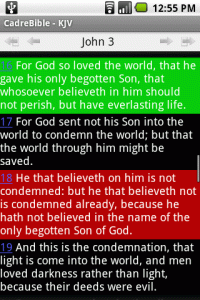
CadreBible is a free off line Bible Browser for Android handsets.
To use CadreBible you need to install the Browser and then install one or more books. The Browser is available for download from this web page as well as from several other Internet sites.
Download the file directly from your handset by pointing your G1 browser to the CadreBible Mobile Page. Once the Bible Browser is installed you can install books easily from the Library within CadreBible on your handset.
Major features of CadreBible 2.0
Offline Bible Browser
A Browser for reading Bibles, Dictionaries, Commentaries and other books related to Bible study.
Library
A Library listing over 30 books available for download and offline reading. Once a book has been downloaded it can be read without an internet connection. The Library is updated periodically, usually monthly, when new books are made available. Multiple books can be downloaded simultaneously and left to download in the background while you continue working.
Search
Press the drop down list to search the Whole Book or a selected section of the book. Any Word means all passages that have any of the words in the search phrase are returned. All Words means only passages that contain all the words are returned. Exact Phrase means only passages that contain the phrase exactly as it appears in the search are returned.
Bookmarks
A means to bookmark verses. Bookmarks are organised into categories which can be given a highlight colour.
Notes
Notes can be attached to verses and can also be highlighted. When long clicking on a verse the notes attached to the verse are listed.
Sessions
Start a session during a sermon, Bible study or Bible school class and record every verse you visit. When adding a note during a session the note is recorded along with the verses. The session can be reviewed later by listing all the verses visited and notes taken.
Footnotes and Cross References
Where a book has footnotes or cross references markers are placed in the text. Click on the markers to see the footnote or list of cross references and then click on the cross reference to go to the passage.
Concordance
Where a book has a concordance links are placed in the text which can be clicked to view the dictionary or other relevant reference material.
To use CadreBible you need to install the Browser and then install one or more books. The Browser is available for download from this web page as well as from several other Internet sites.
Download the file directly from your handset by pointing your G1 browser to the CadreBible Mobile Page. Once the Bible Browser is installed you can install books easily from the Library within CadreBible on your handset.
Major features of CadreBible 2.0
Offline Bible Browser
A Browser for reading Bibles, Dictionaries, Commentaries and other books related to Bible study.
Library
A Library listing over 30 books available for download and offline reading. Once a book has been downloaded it can be read without an internet connection. The Library is updated periodically, usually monthly, when new books are made available. Multiple books can be downloaded simultaneously and left to download in the background while you continue working.
Search
Press the drop down list to search the Whole Book or a selected section of the book. Any Word means all passages that have any of the words in the search phrase are returned. All Words means only passages that contain all the words are returned. Exact Phrase means only passages that contain the phrase exactly as it appears in the search are returned.
Bookmarks
A means to bookmark verses. Bookmarks are organised into categories which can be given a highlight colour.
Notes
Notes can be attached to verses and can also be highlighted. When long clicking on a verse the notes attached to the verse are listed.
Sessions
Start a session during a sermon, Bible study or Bible school class and record every verse you visit. When adding a note during a session the note is recorded along with the verses. The session can be reviewed later by listing all the verses visited and notes taken.
Footnotes and Cross References
Where a book has footnotes or cross references markers are placed in the text. Click on the markers to see the footnote or list of cross references and then click on the cross reference to go to the passage.
Concordance
Where a book has a concordance links are placed in the text which can be clicked to view the dictionary or other relevant reference material.
No reviews yet
Be the first to review and share your experience.
reviews